Web Application Security Testing: A Comprehensive Guide
Learn the essential techniques and methodologies for conducting thorough web application penetration testing.
Web applications have become the primary interface between users, businesses, APIs, cloud infrastructure, databases, and third-party services. As applications become more complex, their attack surface grows—not only through traditional web pages and APIs, but also through authentication systems, client-side JavaScript, cloud services, third-party dependencies, CI/CD pipelines, and business workflows.
A strong web application security assessment therefore goes beyond simply running an automated vulnerability scanner. It requires understanding how the application works, identifying trust boundaries, testing security controls, validating business logic, and demonstrating the real-world impact of weaknesses.
The OWASP Web Security Testing Guide (WSTG) provides a structured methodology covering areas such as information gathering, configuration, identity management, authentication, authorization, session management, input validation, cryptography, business logic, client-side security, and API testing.
1. What Is Web Application Security?
Web application security is the practice of protecting web applications and their underlying infrastructure against unauthorized access, data exposure, manipulation, abuse, and service disruption.
A typical web application may involve multiple layers of architecture:
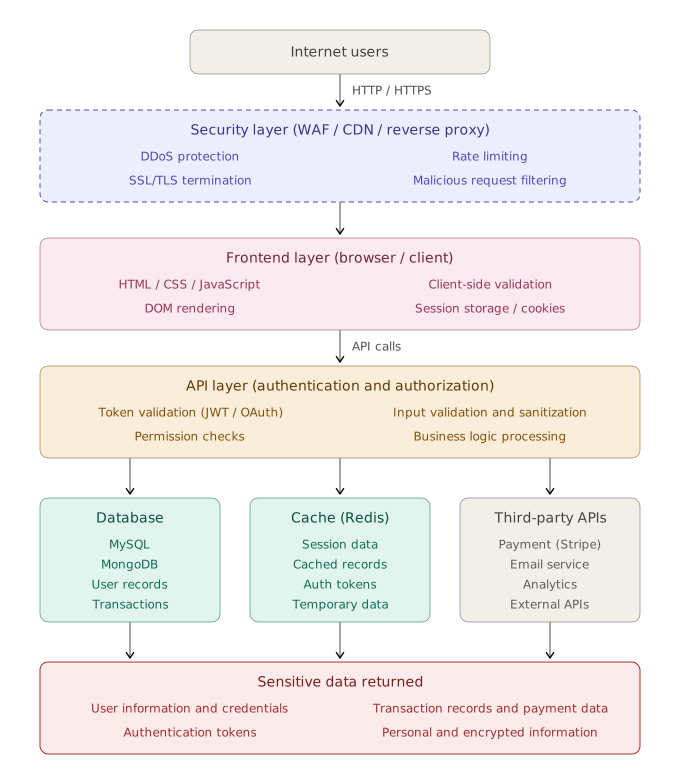
Security must therefore be considered across the entire application stack rather than at a single endpoint.
A vulnerability can exist in:
- Application code
- Authentication mechanisms
- Authorization logic
- APIs
- Database queries
- Session management
- Cloud configuration
- Server configuration
- Third-party dependencies
- Client-side JavaScript
- Business workflows
- CI/CD pipelines
- Logging and monitoring
2. Why Web Application Security Matters
A compromised web application can result in:
- Unauthorized access
- Account takeover
- Sensitive information disclosure
- Financial fraud
- Privilege escalation
- Data manipulation
- Remote code execution
- Infrastructure compromise
- Regulatory violations
- Reputation damage
- Business disruption
For example, an apparently simple authorization flaw could allow User A to modify an API request parameter from /api/account/1001 to /api/account/1002 and retrieve another user's account data. The vulnerability is not necessarily a sophisticated technical exploit. The underlying problem is that the application failed to verify whether the authenticated user was actually authorized to access object 1002.
3. Web Application Security Testing Methodology
A professional assessment should follow a structured methodology:
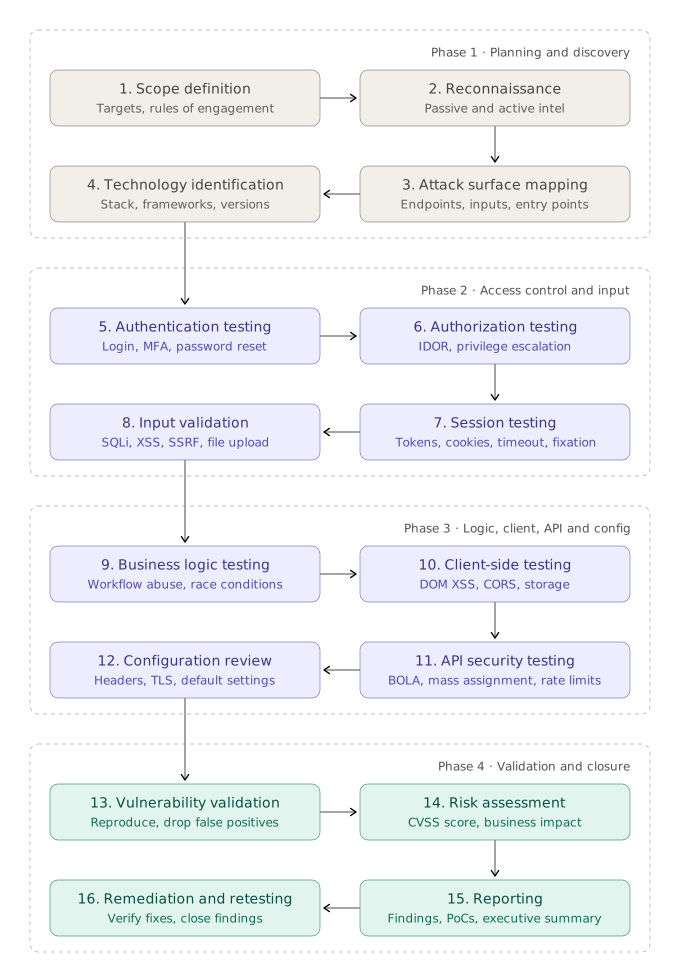
OWASP's current WSTG organizes active testing into major categories including information gathering, configuration and deployment management, identity management, authentication, authorization, session management, injection, error handling, cryptography, business logic, client-side security, and API testing.
4. Scope Definition
Before performing any security test, establish exactly what is authorized. Define:
Target:
- https://example.com
- https://app.example.com
- https://api.example.com
In-scope components:
- Web application
- REST APIs
- GraphQL APIs
- Mobile APIs
- Authentication portal
- Admin portal
Out-of-scope components:
- Production database
- Third-party payment gateway
- Social engineering
- Denial-of-service testing
- Physical infrastructure
- Employee endpoints
Testing restrictions:
Define: testing window, source IPs, rate limits, accounts provided, test data restrictions, destructive testing restrictions, exploitation restrictions, and data handling requirements.
Never perform security testing against systems without authorization.
5. Reconnaissance
Reconnaissance is the foundation of a web application security assessment. You can only test what you discover; identifying applications, hosts, endpoints, technologies, and exposed functionality is therefore critical before deeper testing begins.
Passive Reconnaissance:
Passive reconnaissance attempts to collect information without directly interacting with the target application. Potential sources include:
- Certificate Transparency
- Search engines
- Public documentation
- DNS records
- Public repositories
- Archived URLs
- Public JavaScript files
- Technology fingerprints
Active Reconnaissance:
Active reconnaissance directly interacts with the authorized target:
- HTTP probing
- Directory discovery
- Endpoint enumeration
- Parameter discovery
- API discovery
- Application crawling
- Technology identification
6. Attack Surface Mapping
An application may contain significantly more functionality than what appears on its homepage. During mapping, identify:
Application
│
├── /login
├── /register
├── /forgot-password
├── /dashboard
├── /profile
├── /admin
├── /api
│   ├── /users
│   ├── /orders
│   ├── /payments
│   └── /documents
│
├── /upload
├── /download
├── /search
└── /graphql
Every endpoint can potentially introduce a new attack surface. Identify: URLs, HTTP methods, parameters, headers, cookies, request bodies, file uploads, API endpoints, GraphQL operations, WebSockets, authentication flows, administrative functionality, and hidden functionality.
7. Technology Fingerprinting
Identify technologies used by the application:
Frontend: React, Angular, Vue, Next.js, jQuery
Backend: Node.js, Java/Spring, PHP, ASP.NET, Python/Django, Ruby/Rails
Infrastructure: Nginx, Apache, IIS, Cloudflare, AWS, Azure, Kubernetes
Database: MySQL, PostgreSQL, MongoDB, Microsoft SQL Server, Redis
Technology identification helps determine which security controls and known weaknesses should receive additional attention.
8. Authentication Security
Authentication answers: "Who are you?"
Login Testing:
- Weak passwords
- Username enumeration
- Rate limiting
- Account lockout
- MFA implementation
- Authentication bypass
- Credential exposure
- Alternative authentication channels
Password Reset:
- Token predictability
- Token reuse
- Token expiration
- User enumeration
- Host-header issues
- Missing authentication
- Account takeover scenarios
Multi-Factor Authentication:
- MFA enforcement
- MFA bypass
- Recovery mechanisms
- Backup codes
- Session persistence
- Remember-device functionality
- OTP validation
Account Enumeration:
An application should avoid revealing whether an account exists through differences in messages, status codes, response sizes, or timing.
9. Authorization Security
Authentication determines who the user is. Authorization determines: "What is that user allowed to do?"
Authorization vulnerabilities are among the most important issues in modern applications. OWASP's 2025 Top 10 continues to rank Broken Access Control as A01, the highest category.
Horizontal Access Control: User A accesses User B's resources
Vertical Access Control: A low-privileged user accesses administrative functionality
Privilege Escalation: Test whether users can improperly obtain admin privileges, manager privileges, internal roles, or API privileges
10. IDOR / BOLA
Insecure Direct Object Reference (IDOR), commonly discussed in API security as Broken Object Level Authorization (BOLA), occurs when the application exposes an object identifier but fails to enforce authorization.
GET /api/user/123/profile
Authenticated user ID = 123

User modifies the request to:
GET /api/user/124/profile

If another user's data is returned,
the application is vulnerable.
Test object references in: URLs, JSON bodies, query parameters, headers, GraphQL arguments, and IDs (files, invoices, orders, documents, users).
11. Session Management
After authentication, applications typically maintain state through cookies, session IDs, JWTs, access tokens, and refresh tokens. Security testing should evaluate:
Cookie Security:
- Secure flag (HTTPS only)
- HttpOnly flag (no JavaScript access)
- SameSite attribute (CSRF protection)
Session Fixation: Determine whether an attacker can cause a victim to authenticate using a session identifier already known to the attacker.
Session Expiration: Check idle timeout, absolute timeout, logout invalidation, password-change invalidation
Concurrent Sessions: Determine whether old sessions remain valid after logout, password change, MFA enrollment, or account compromise response
12. JWT Security
Applications increasingly use JSON Web Tokens. A JWT typically contains: Header.Payload.Signature
{
  "alg": "RS256",
  "typ": "JWT"
}
Potential security areas include:
- Weak signing configuration
- Algorithm confusion
- Improper signature validation
- Missing expiration
- Excessive token lifetime
- Sensitive information in claims
- Improper audience validation
- Improper issuer validation
- Refresh-token weaknesses
A JWT should never be considered secure merely because it is signed. The application must correctly validate the token's signature, issuer, audience, expiration, intended purpose, and claims.
13. Input Validation
Every user-controlled input should be considered untrusted. Common input sources include:
- URL parameters
- Query parameters
- POST bodies
- JSON
- HTTP headers
- Cookies
- File uploads
- WebSocket messages
- GraphQL variables
Never trust client-controlled input.
Input validation should verify: type, length, format, allowed characters, range, and business constraints.
14. Injection Attacks
Injection occurs when untrusted data becomes interpreted as part of a command or query.
Common forms include:
- SQL Injection
- NoSQL Injection
- OS Command Injection
- LDAP Injection
- XPath Injection
- Template Injection
- Expression Language Injection
User Input
     ↓
Application
     ↓
Interpreter / Database
     ↓
Unexpected command or query behavior
The strongest defense is to keep data separate from executable syntax, such as through parameterized database queries and safe APIs.
15. Cross-Site Scripting (XSS)
Cross-Site Scripting occurs when attacker-controlled content is interpreted as executable browser-side code.
Major forms include:
Reflected XSS: Input is immediately reflected in the response (Request → Server → Response → Browser)
Stored XSS: Malicious content is stored and later delivered to users (Attacker → Application → Database → Victim)
DOM-Based XSS: The vulnerability occurs primarily through client-side JavaScript
Defenses include:
- Context-aware output encoding
- Safe DOM APIs
- Input validation
- Content Security Policy
- Avoiding unsafe HTML sinks
16. Cross-Site Request Forgery (CSRF)
CSRF occurs when a malicious site causes a victim's browser to perform an authenticated action against another application.
Victim logged into bank
        ↓
Visits malicious website
        ↓
Browser sends authenticated request
        ↓
Sensitive action occurs
Testing should examine: state-changing requests, CSRF tokens, SameSite cookie configuration, origin validation, and referer validation.
17. CORS Security
Cross-Origin Resource Sharing controls how browsers allow web pages from one origin to interact with resources from another. Review headers such as:
- Access-Control-Allow-Origin
- Access-Control-Allow-Credentials
- Access-Control-Allow-Methods
- Access-Control-Allow-Headers
Potential issues include:
- Overly permissive origins
- Reflecting arbitrary origins
- Credentials combined with unsafe origin policies
- Excessively broad methods
- Unnecessary exposed headers
18. Security Headers
HTTP security headers can provide additional browser-side security controls. Important headers include:
- Content-Security-Policy
- Strict-Transport-Security
- X-Content-Type-Options
- Referrer-Policy
- Permissions-Policy
- Set-Cookie security attributes
Security headers should be treated as defense-in-depth rather than substitutes for secure application code.
19. File Upload Security
File-upload functionality can introduce significant risk. Test:
- File extension validation
- MIME-type validation
- File signature validation
- File size restrictions
- Filename handling
- Storage location
- Execution permissions
- Path traversal
- Archive extraction
- Image processing
- SVG handling
- Malware scanning
- Authorization to uploaded files
A secure architecture generally avoids allowing uploaded files to become executable server-side content.
20. Path Traversal
Path traversal occurs when user-controlled input influences filesystem paths without adequate validation.
/download?file=report.pdf
becomes:
/download?file=../../sensitive-file
Testing should examine: file download, file preview, file upload, template selection, log access, and backup retrieval.
The correct defense is not simply blocking one string pattern. Applications should use safe path handling, canonicalization, strict allowlists, and controlled storage boundaries.
21. Server-Side Request Forgery (SSRF)
SSRF occurs when an application makes network requests based on attacker-controlled input.
Attacker
   ↓
Application
   ↓
Attacker-controlled URL
   ↓
Internal service
Potential targets could include: internal APIs, administrative services, cloud metadata services, and internal dashboards.
Modern OWASP Top 10:2025 incorporates SSRF into the broader Broken Access Control category.
22. Business Logic Testing
One of the most important areas of professional penetration testing is business logic. Automated scanners often struggle to identify business-logic vulnerabilities because the issue depends on understanding how the application is supposed to operate.
Consider an e-commerce workflow:
Add Product
     ↓
Apply Discount
     ↓
Calculate Total
     ↓
Payment
     ↓
Order Confirmation
A tester should ask: What happens if I perform these operations in an unexpected order?
Examples:
- Applying a discount multiple times
- Reusing an expired coupon
- Modifying price-related parameters
- Skipping payment steps
- Replaying transactions
- Changing quantities after payment
- Reusing transaction identifiers
- Bypassing approval workflows
23. API Security
Modern applications are increasingly API-driven. APIs should be tested for:
Authentication: Missing authentication, weak tokens, token leakage, improper token validation
Authorization: BOLA, function-level authorization, privilege escalation
Input Validation: Injection, type confusion, unexpected parameters, mass assignment
Rate Limiting: Check sensitive endpoints such as /login, /otp, /password-reset, /payment, /search
Data Exposure: Ensure APIs do not return unnecessary fields. Example:
{
  "name": "John",
  "email": "john@example.com",
  "passwordHash": "...",
  "internalRole": "admin"
}
24. GraphQL Security
GraphQL introduces a different attack surface. Security testing should consider:
- Introspection exposure
- Authorization at resolver level
- Excessive query depth
- Query complexity
- BOLA
- Information disclosure
- Injection
- Batch queries
- Aliases
- Error messages
Authorization must be enforced at the underlying business/resource layer, not merely at the GraphQL endpoint.
25. Client-Side Security
Modern web applications can contain substantial client-side functionality. Review:
- JavaScript files
- Source maps
- DOM manipulation
- Client-side authorization
- Sensitive data in local storage
- Session storage
- Browser storage
- Third-party scripts
- Client-side secrets
- DOM XSS
- PostMessage usage
- WebSockets
Never treat client-side controls as authoritative security controls. Hiding the administrative UI does not constitute authorization. The backend must independently enforce access control.
26. Security Misconfiguration
Security misconfiguration has become particularly important. In OWASP Top 10:2025, it is ranked A02, up from #5 in the 2021 edition. Potential issues include:
- Debug mode enabled
- Default credentials
- Unnecessary services
- Directory listing
- Exposed administration interfaces
- Verbose error messages
- Stack traces
- Missing security headers
- Insecure cloud permissions
- Sample applications
- Default configuration
- Exposed configuration files
27. Error Handling
Error messages can reveal valuable information. Example:
Database connection failed:
Microsoft SQL Server 2022
Database: production_users
Server: db-prod-01
This may reveal: database technology, internal hostname, architecture, file paths, framework versions, SQL statements, and application structure.
Applications should provide users with controlled error responses while retaining sufficient detail in secure internal logging.
28. Cryptography
Cryptographic testing should focus on how sensitive information is protected. Review:
Data in Transit: Ensure sensitive communications use secure transport.
Password Storage: Passwords should not be stored as plaintext or using inappropriate fast hashes.
Token Security: Review randomness, entropy, expiration, and key management
Encryption: Evaluate algorithm selection, key length, key storage, key rotation, and certificate configuration
Cryptography should be implemented using well-maintained, established libraries rather than custom cryptographic algorithms.
29. Software Supply Chain Security
The modern application depends heavily on external components:
Application
│
├── npm packages
├── Python packages
├── Java dependencies
├── Docker images
├── GitHub Actions
├── CI/CD plugins
└── Third-party APIs
OWASP Top 10:2025 expanded the previous vulnerable/outdated-components concept into A03: Software Supply Chain Failures, covering weaknesses across dependencies, build systems, and distribution infrastructure.
Controls should include:
- Dependency inventory
- Dependency pinning
- Vulnerability scanning
- Software composition analysis
- Secure CI/CD
- Package integrity verification
- Secrets management
- Build-system hardening
- Dependency update processes
30. Logging and Monitoring
Security controls are incomplete if organizations cannot detect attacks. Applications should log meaningful security events such as:
- Authentication failures
- Privilege changes
- Password changes
- MFA changes
- Administrative actions
- Suspicious access
- High-risk transactions
OWASP Top 10:2025 includes A09: Security Logging & Alerting Failures.
31. Common Tools
Proxy / Manual Testing:
- Burp Suite
- OWASP ZAP
- Caido
Reconnaissance:
- Nmap
- Subfinder
- Amass
- httpx
- WhatWeb
Content Discovery:
- ffuf
- feroxbuster
- dirsearch
Vulnerability Testing:
- Nuclei
- Nikto
- SQLMap
Network Analysis: Wireshark
Mobile/API Testing:
- Burp Suite
- Postman
- Insomnia
32. Automated Scanning vs Manual Testing
| Automated Testing | Manual Testing |
|---|---|
| Fast | Deeper |
| Repeatable | Context-aware |
| Good for known patterns | Good for unknown logic flaws |
| Large-scale coverage | Business logic analysis |
| Lower human effort | Requires expertise |
| Can generate false positives | Can validate impact |
A mature assessment combines both:
Automated Discovery
        +
Automated Scanning
        +
Manual Testing
        +
Business Logic Analysis
        +
Exploit Validation
        =
Comprehensive Assessment
33. Vulnerability Validation
Finding a suspicious response is not enough. A professional tester should determine:
- Is the issue reproducible?
- Is it actually exploitable?
- What security control failed?
- What data or functionality is affected?
- What privileges are required?
- What is the realistic business impact?
- Can exploitation be reliably demonstrated?
- Is there a compensating control?
This reduces false positives and makes reports substantially more useful.
34. Risk Assessment
Technical severity alone is not enough. Consider:
Likelihood
      ×
Technical Impact
      ×
Business Impact
      =
Overall Risk
A vulnerability exposing public information may have limited impact. The same vulnerability exposing customer financial information, authentication tokens, personal information, payment data, or internal administrative data could become critical.
OWASP's risk model explicitly recognizes that the same software weakness can produce very different business impacts depending on the organization and the assets involved.
35. Vulnerability Reporting
A good penetration-testing report should allow developers and management to understand the issue and fix it. A strong finding structure is:
- Finding Title
- Severity
- CVSS
- Affected Endpoint
- Description
- Business Impact
- Technical Impact
- Proof of Concept
- Steps to Reproduce
- Root Cause
- Recommendation
- References
- Retest Status
36. Retesting
A penetration test should not end when the report is delivered. After remediation:
Finding
   ↓
Developer Fix
   ↓
Security Retest
   ↓
Original PoC Re-executed
   ↓
Fixed?
 ┌───┴───┐
Yes     No
 ↓       ↓
Close   Reopen
Retesting should verify:
- Original vulnerability is fixed
- Security control works correctly
- No bypass remains
- Fix did not introduce another vulnerability
37. Secure Development Lifecycle
Web application security should not exist only at the penetration-testing stage. A mature security lifecycle looks like:
Requirements
     ↓
Threat Modeling
     ↓
Secure Design
     ↓
Secure Coding
     ↓
Code Review
     ↓
SAST / SCA
     ↓
DAST
     ↓
Penetration Testing
     ↓
Deployment
     ↓
Monitoring
     ↓
Incident Response
     ↓
Continuous Improvement
Security should therefore be integrated into the SDLC, rather than treated as a final quality gate.
38. Web Application Security Checklist
Reconnaissance:
- Identify domains
- Identify subdomains
- Identify IP addresses
- Identify technologies
- Identify application endpoints
- Identify APIs
- Identify administrative interfaces
- Map application workflows
Authentication:
- Login testing
- Password policy
- Account enumeration
- Brute-force protection
- MFA
- Password reset
- Account recovery
- Authentication bypass
Authorization:
- Horizontal access control
- Vertical access control
- IDOR/BOLA
- Privilege escalation
- Administrative functions
- API authorization
Session Management:
- Cookie flags
- Session fixation
- Session expiration
- Logout
- Concurrent sessions
- Token security
Input Validation:
- SQL injection
- NoSQL injection
- XSS
- Command injection
- SSTI
- LDAP injection
- Path traversal
Business Logic:
- Workflow bypass
- Price manipulation
- Transaction manipulation
- Replay attacks
- Race conditions
- Rate-limit bypass
- Coupon/discount abuse
Configuration:
- Security headers
- TLS configuration
- Debug mode
- Default credentials
- Directory listing
- Backup files
- Error messages
- Admin interfaces
APIs:
- Authentication
- Authorization
- BOLA
- Rate limiting
- Mass assignment
- Excessive data exposure
- Input validation
- GraphQL security
Client Side:
- DOM XSS
- Local storage
- Session storage
- JavaScript secrets
- Source maps
- Third-party scripts
- postMessage
- CSP
39. A Practical Testing Workflow
For a real-world engagement, a useful workflow is:
Phase 1 - Understand
Scope → Architecture → Users → Roles → Business Processes

Phase 2 - Discover
Domains → Endpoints → Parameters → APIs → Technologies

Phase 3 - Attack Surface
Authentication → Authorization → Sessions → Input → Files →
APIs → Business Logic → Client Side → Configuration

Phase 4 - Validate
Identify → Reproduce → Exploit Safely →
Determine Impact → Document

Phase 5 - Report
Finding → Evidence → Impact → Risk → Remediation

Phase 6 - Retest
Fix → Retest → Verify → Close
40. Key Principles
A strong web application security program follows several fundamental principles:
- Never trust client-side controls: Anything enforced only in JavaScript can potentially be modified by the user.
- Authentication is not authorization: Knowing who the user is does not determine what they are allowed to access.
- Every endpoint needs authorization: Do not assume that an endpoint is protected because the application UI hides it.
- Every user input is untrusted: Validate and safely handle input at security boundaries.
- Business logic matters: A technically secure endpoint can still be part of an insecure workflow.
- Automated scanners are not enough: Automation provides coverage; manual analysis provides understanding.
- Minimize attack surface: Disable unnecessary functionality, services, accounts, permissions, and interfaces.
- Log security-relevant events: You cannot reliably investigate attacks that leave no useful evidence.
- Security is continuous: Applications, dependencies, infrastructure, and threats constantly change.
- Test according to risk: Not every vulnerability has the same business impact.
Conclusion
Web application security is much broader than identifying SQL injection or XSS. A mature security assessment examines the entire application ecosystem—from reconnaissance and attack-surface mapping to authentication, authorization, session management, APIs, business logic, client-side functionality, configuration, cryptography, dependencies, logging, and deployment.
The OWASP Top 10:2025 provides a high-level view of the most important application-security risk categories, while the OWASP Web Security Testing Guide provides a much more detailed testing methodology.
For a security professional, the objective should not simply be: "Find vulnerabilities." It should be: "Understand the application, identify where security controls can fail, demonstrate realistic impact, and provide actionable remediation."
That mindset is what transforms vulnerability scanning into professional web application penetration testing.
Recommended References
- OWASP Web Security Testing Guide - detailed testing methodology and test cases.
- OWASP Top 10:2025 - current high-level application security risk categories.
- OWASP Web Security Testing Guide v4.2 - latest versioned WSTG release.